
Healthy Screen Habits
Practical ways to protect your eyes in a digital world
”I'm not here to frighten you about screens. I'm here to teach you how to use them intelligently”-Dr Cheryl Lee
Screens are now part of everyday life—but healthy screen habits can make a significant difference to how your eyes feel and, particularly in children, how we manage myopia risk.
Long periods of near work can contribute to digital eye strain, reduced blinking and dry eye symptoms. For children, the bigger picture also includes outdoor time, healthy visual habits and managing the amount of prolonged near work.
At The Eye Clinic by Dr Cheryl Lee, we believe the goal isn't to eliminate screens. It is to help families develop realistic habits that protect eye comfort and support healthy visual development in a digital world.
Healthy Screen Habits
📱 Phone Distance
How to Set Up Screen Distance on Your iPhone
A simple iPhone setting that can remind children to move their phone farther away.
🔵 Blue Light
Do Blue Light Glasses Work?
What the evidence actually tells us about blue light, screens and your eyes.
🌙 Night-Time Screens
How to Reduce Blue Light on Your iPhone
How to use Night Shift and other settings for more comfortable evening screen use.
🎨 Screen Background & Text
Which Screen Background Is Best for Your Eyes?
Simple adjustments to contrast, brightness and background colour that can make screens more comfortable.
👀 Digital Eye Strain
Why Do My Eyes Hurt After Screen Use?
Understand the difference between digital eye strain and underlying dry eye disease.
👨👩👧 Children & Screens
Healthy Screen Habits for Children
Practical advice for parents on distance, breaks, outdoor time and developing sustainable habits.
Dr Lee's Screen Rules
1. Keep a comfortable distance
Don't let children hold phones/books right up to their faces.
Be aware that if they do, it could also be a sign of myopia!
2. Blink
Screens make us concentrate and blink less.
3. Take breaks
Look away from near work regularly-for me it is every 20 Minutes
4. Get outdoors
Especially important for children and myopia management.1 hour outdoors in the sunshine.
5. Don't sacrifice sleep
Screens late at night can interfere with healthy sleep habits.
6. Make the screen comfortable
Adjust brightness, contrast, glare and text size.
7. If your eyes remain uncomfortable, investigate why.
Persistent symptoms may be dry eye disease rather than simply "too much screen time."
Why Does Blinking Matter?
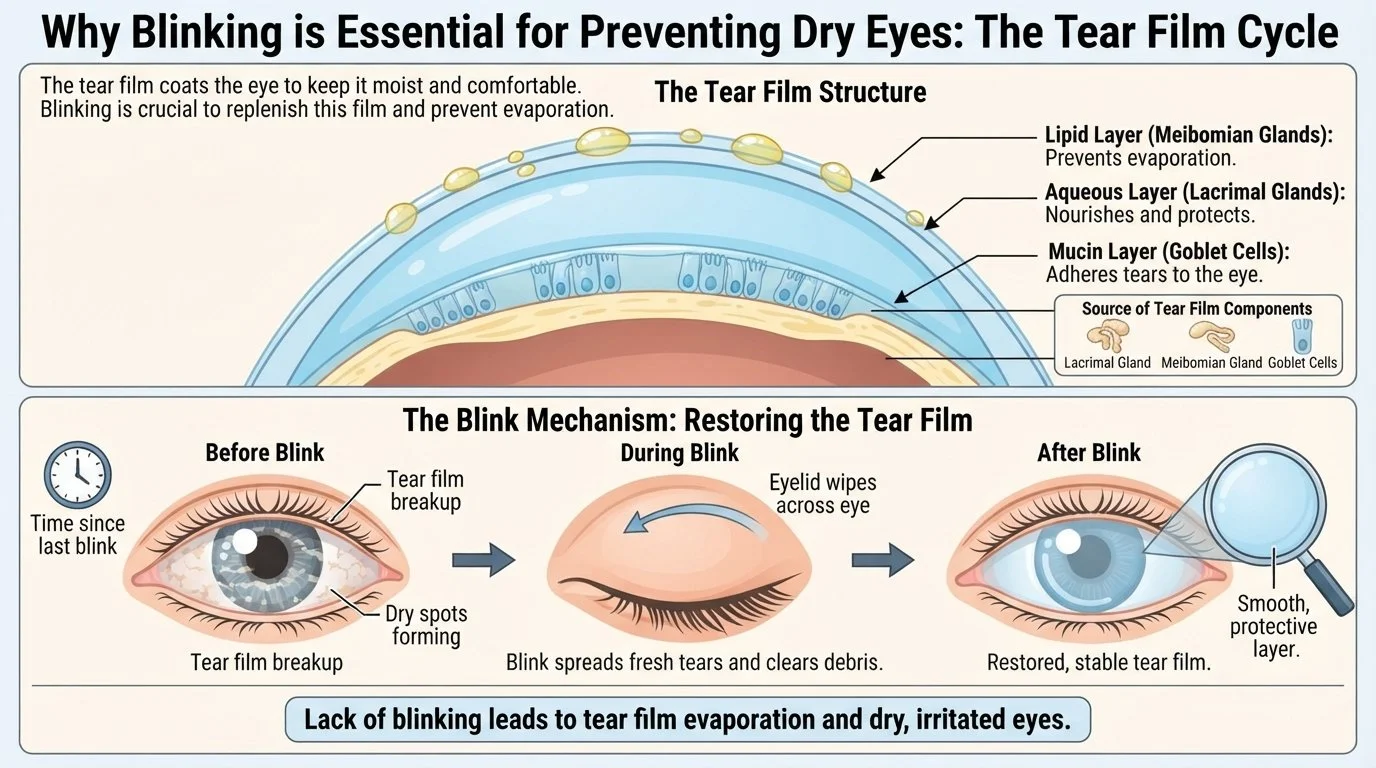
Every time you blink, you spread a fresh layer of tears across the surface of your eye.
Your tears aren't simply water. They are a complex tear film made up of several layers that work together to keep the cornea smooth, comfortable and protected.
The oil layer, produced by the meibomian glands in your eyelids, is particularly important because it slows evaporation of the watery part of your tears.
When you stare at a screen for a long period, you may blink less and produce more incomplete blinks.
The result?
Your tears evaporate more quickly and the surface of the eye becomes dry and irritated.
This is one reason why your eyes can feel perfectly comfortable in the morning but become dry and burning after several hours on a computer or phone.
But Sometimes the Problem isn't the Screen
This is an important distinction.
If your eyes become uncomfortable every time you use a screen, it is tempting to blame the screen itself.
But sometimes the screen is simply revealing an underlying dry eye problem.
That is why two people can spend exactly the same amount of time on a computer, yet one develops severe burning and dryness while the other has no symptoms at all.
The screen may not be the underlying problem. It may simply be exposing one.
Why Eye Drops Don't Always Solve It
If your eyes feel dry after screen use, artificial tears can provide temporary relief.
But if the underlying problem is poor-quality tears, repeatedly adding more water may not solve the reason your tears are evaporating too quickly.
Screens and Meibomian Gland Dysfunction (MGD)
Your meibomian glands are tiny oil-producing glands along the eyelid margins.
Healthy meibomian oil should flow easily and form a protective layer over your tears.
When the oil becomes thick or the glands become blocked, the tear film becomes less stable and evaporates more quickly.
This can contribute to:
Meibomian Gland Dysfunction → Tear evaporation → Dryness → Burning and irritation
Prolonged screen use can make this more noticeable because of reduced blinking.
What About Blepharitis?
Blepharitis is inflammation of the eyelid margins and is another common contributor to dry, irritated eyes.
If you have blepharitis, Demodex or unhealthy eyelid margins, your eyes may be particularly sensitive to prolonged screen use.
When Screen Strain May Actually Be Dry Eye Disease
If your eyes regularly burn, sting or feel gritty after screen use, don't simply assume that you need to "use your phone less."
Consider having your eyes assessed if:
Symptoms are persistent
Artificial tears provide only temporary relief
Your eyes are frequently red
You have recurrent eyelid inflammation
Your vision fluctuates during the day
Your eyes feel worse towards the evening
You have difficulty wearing contact lenses
You wake with dry or uncomfortable eyes
Sometimes the solution isn't simply less screen time.
It is finding and treating the underlying cause of the dry eye.
Dr Lee’s Perspective
I don't believe every patient with screen-related discomfort needs the same treatment. For some, better screen habits are enough. For others, screens are simply revealing an underlying problem such as meibomian gland dysfunction, blepharitis or ocular surface inflammation.
I look at the whole picture and personalise treatment according to the cause—not just the symptoms.
Screens are part of modern life. My aim is to help your eyes cope with them comfortably.